Showing posts with label Teacher Tip of the Week. Show all posts

Wednesday, June 3, 2015

Summer Reading/Book-in-the-Bag Check Out Center

     I've been doing a lot of reading so far this summer break!  First, I wanted to read something that had nothing to do with creating products for TPT.  I started with The Selection Series by Kiera Cass.  These books were wonderful.  The audience is intended for young teen, but I enjoyed them all the same.  I am currently reading the next book, The Heir.

Click Here!
Next, I had to think about my own children.  I wanted to read whatever they were reading so I could ask comprehension questions along the way.  I was impressed with my 9 year old's choice of I Survived, The Nazi Invasion, 1944 by Lauren Tarshis.  I love these historical fiction books that expose our children to events of the past.  I got a little carried away and decided to tell him all about Anne Frank.  I even showed him the Annex virtual tour.  Well, that scared him to death.  I think it was the spooky music they played while visiting the virtual tour!  

Check this out!

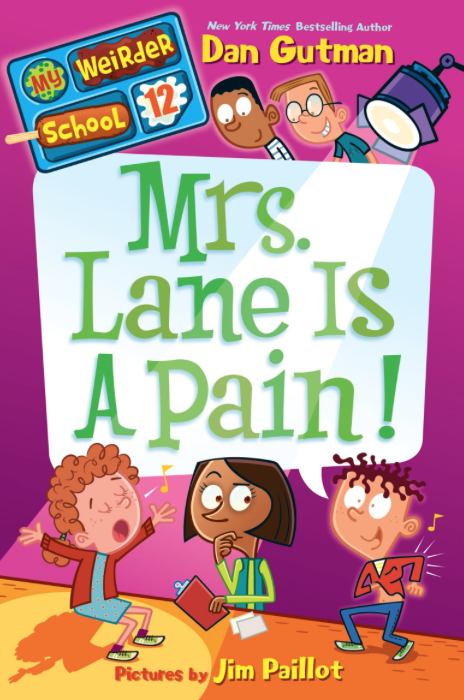
 So, now I am off to reading some more of the My Weirder School and My Weirdest School series books. These are the books that made my child a reader, so I have to be very thankful for the author who wrote them.  As silly as I think they are, I am going to help promote these books by creating materials to use in the classroom.  I only have a class set of Mrs. Lane is a Pain.  Therefore, I decided to create a Book-in-the-Bag Check Out Center.  

     In this center, I will store the brochures I create with the book in a gallon size bag.  The students can check out a bag to take home.  As they read the book for their nightly reading, they will complete the brochures.  Then, I can check for comprehension when the brochures are returned.   So, far I have created brochures and final assessments on the following.  
Brochures Here!

Brochures Here!
    

Brochures Here!

You will have to check out my store from time to time because as my children read books, I am creating brochures for those, as well.  In other words, I should have several I Survived brochures by the end of summer!!!  
Have a wonderful break, and Happy Reading!


Saturday, April 25, 2015

Fitbit Craziness! Take Time to Exercise

This week has been crazy!!!  First of all, testing took place.  Talk about boring!!  As monitors, we have to walk around the room for hours! Well, that fell right into place with my Fitbit challenge I was presented with this week.  Yes, a Fitbit challenge with several of my friends at school. 

So the challenge took place from Monday at 12:00 A.M. until Friday at midnight.  I have not really exercised since Hilton Head, so I decided, “What the heck?!”

First, I had to buy a new battery for my Zip.  I have had my Fitbit for so long, that the battery had died.  Sunday was the first day with my Fitbit back on to measure my steps.  Well, let’s just say, I should have left it off.  That’s the day we went to Topgolf, and I barely got up!  Therefore, the challenge that was beginning that night was not looking good for me.  However, Monday morning, the first day of the challenge, I woke up ready to conquer!!!

HERE’S WHERE FITBIT CRAZINESS BEGINS!!!!  Walking at school was not a challenge because I do that anyway.  The challenge began when I got home.  However, I basically walked from the time I got home until we left for the golf course.  Then, I walked 9 holes of golf!  When I left the golf course, I had over 24,000 steps in for the day.  I had never walked more than 15,000!!!  It didn’t stop there!  When I got home, I kept walking.  I walked until I collapsed in bed.  Needless to say, after day one, I was ahead of the group.

Day 2 was very similar, and I remained in the lead after Tuesday.  Wednesday FITBIT CRAZY NUMBER 1 entered my life.  FITBIT CRAZY NUMBER 1 told me she usually walked about 25,000 steps a day.  Well the race was on, and she was ready to compete.  Since she said she only walked 25,000 steps a day, I decided to watch Nashville sitting down, rather than walking.  BIG MISTAKE!  This was the day, FITBIT CRAZY NUMBER 1 decided to pull ahead.  On my lowest step day of the week, 24,000, FITBIT CRAZY NUMBER 1 walked 36,000 steps.  Yep, by Thursday night she had pulled ahead 20,000 steps!!!

Meanwhile, at school, all the students were sending me messages from FITBIT CRAZY NUMBER 1 to tell me not to walk at recess, to just relax!  My children at home were telling me FITBIT CRAZY NUMBER 1 told them to tell me to go to bed by 9:00 P.M.  My husband wanted to call her and tell her the competition was over!  Her husband wanted to call ME and tell me to settle down!  The truth was, we were killing ourselves just for bragging rights!!!!  BUT WE WERE HAVING A BLAST!  We would text each other at night and say, “Go to bed!”  We had more laughs than I have had in a long time.


Back to the story, it was Thursday night and I was wondering how in the world I was going to catch this woman.  My husband took me to the Horse Park, and we walked!  We found an awesome cemetery.  The kids became tired after awhile, so they went to sit in the truck.  I walked around the parking lot until I felt I had done enough for the day.  I decided to go to bed early (10:00), to wake up refreshed Friday morning.


FITBIT CRAZY NUMBER 1 has a running club on Mondays, Wednesdays, and Fridays where the students run around the track for 30 minutes.  I had a grand idea!   I would be on the track before FITBIT CRAZY NUMBER 1 could get out there!  AND I WAS, AND SHE WAS SURPRISED!  I walked/ran over 2 laps before the running club could even begin.  Oh, and FITBIT CRAZY NUMBER 1’S battery had died, so she had lost some steps charging the battery! Boo Hoo, right?!!  We joked the whole time we were running, and the day was off to an amazing start!  When I went inside to start teaching, I was already at 7,000 + steps! 

It’s testing time, so I needed to review the mountains and rivers with the students.  We studied them in quarter one, so they definitely needed a refresher!  My goal was to walk ALL DAY LONG, so we went to the black top outside and we practiced our rivers and mountains on the black top map!  Not only did I get my steps in, my students had a BLAST!!!


The remainder of the school day was spent walking!  We read two chapters of Because of Winn Dixie.  I let each student read, while I followed along, WALKING, OF COURSE!!
Then, we had recess where I walked on the track with two other FITBIT CRAZIES who weren’t near as crazy as FITBIT CRAZY NUMBER 1! All in all, I did an amazing job walking.  When, I left school I had over 22,000 steps!  With only 9 hours to go, I knew I had to continue walking.  I came home and walked/ran at my house.  I did this until it was time to go to my son’s soccer game, where I walked the entire time!!!  I actually could see the game better because I followed the ball wherever it went!  After the game, my family went to eat with our friends.  I started to feel sleepy, so after dinner, I took a quick shower.  Then, I put on my walking shoes!!!!  I walked until 11:57 A.M. last night!  The challenge ended at 12:00 A.M.  At one point, I even went to the pantry to grab the Cheese Puffs.  I ate them and WALKED!!!

At 11:57 I did the sync, and of course, I was well in the lead.  FITBIT CRAZY NUMBER 1 usually didn’t complete her sync until morning, so it was off to bed.  My husband looked at me when I went to bed and asked if I was done.  I said, “The time is up, and I have done all I can do!”
So, that’s where it ended.  I received a badge for walking 55,000 steps in ONE DAY, and my grand total for the five days was 160,797 steps, completely insane! 

This morning, FITBIT CRAZY NUMBER 1 completed her sync, and she won…. She ended with 168,568, even more insane.  She sent me a text first thing, and said, “55,000 steps!, holy cow!”  I told her thank you for the motivation, and now we are going to start running after school!

I learned three valuable lessons this week….
#1 Don’t forget to exercise even when life is busy.  I felt so good this week, minus the aches and pains!!!
#2 Have fun with your school friends.  The students feed off of it, and love it.  
#3 NEVER TELL A COMPETITIVE TEACHER HOW MANY STEPS YOU HAVE WALKED IN A DAY BEFORE YOU LEAVE SCHOOL, SO SHE KNOWS SHE HAS TO KILL IT THAT NIGHT!  

FITBIT CRAZY NUMBER 1 earned two badges this week in the hustle!  I would say this was beneficial for us both.  I had an amazing time and a lot of laughs.  I failed to mention the other ladies because this one was my competition this particular week, but I had a ton of fun with them, too!  Everyone did an amazing job!!!  Remember this was only for five days!  I guess I am FITBIT CRAZY #2 and proud of it!!


Have a blessed week, and have a FITBIT challenge!

Sunday, April 12, 2015

Take a Break


      I did not post last Sunday because I did exactly what the teacher tip of the week says.  I took a break! My boys and I went to Hilton Head Island for the week of our Spring Break.  We met my sister and my mom there.  We had an amazing time.  

   The teacher tip of the week is TAKE A BREAK!  As much as we spend preparing materials, researching ideas, and thinking about our classrooms and students, we need a break.  I had a professor in college tell our class that we needed to find a hobby that separates us from teaching.  I did just that this week.  I went to Hilton Head and did not take my computer for the first time in awhile.  I read a Danielle Steele book, Forever Friends, which I highly recommend.  Most importantly, I enjoyed my family, and I am thankful I did!  I feel completely refreshed and ready to end this year with a bang! Here are a few pictures from our vacation.
At the Square
My Mom and I (Floppy hats are awesome!)

Being Silly!
Our pet alligator at the condo!
Bury Me!


There's always time for miniature golf!!!
I hope you enjoyed your time off, if you had some!  We sure did, and I am thankful for the time I spent with my family with no computer!!! Remember, take a break!

Oh, one last thought! I found this while I was at the beach and I absolutely LOVE it!!!


Sunday, March 29, 2015

Ipads in the Classroom- Math

Just like last week, I knew I would forget some math apps and have to add them to this week’s blog.  I cannot believe I forgot the best FREE APPS of all!!!


Thinking Blocks for fractions, addition and subtraction, multiplication and division, and ratios!
These apps. help students understand problem solving by modeling the problem before solving it.  These apps are free and are a great help in making students understand what they are being asked to do. Then, the students can solve the problem because they understand it!


Thinking Blocks Click Here!


When researching to find the Thinking Blocks Page for you to refer to, I found a lot of FREE Math Apps. by MathPlayground.com. I decided to keep this week's blog subject, Math.  I am going to add the picture, and then add the description below it.  Again, these are FREE!


Click Here


Click Here

An app. I use all the time in my classroom to work on Fact Fluency is Operation Math Code Squad.  I love it because you can choose the operation or mix operations!  The students are on a mission to answer the facts the quickest while being accurate.  Talk about motivating, the students LOVE it!  It's a little pricey, but worth it!!  Four players can play on one Ipad.  I sit the Ipad flat on a desktop and add four chairs around the desk.  


Click Here
The National Council of Teachers of Mathematics has some great Math apps, as well.  I like the following, and I use them in my classroom. They are FREE!


Click Here


When researching for these, I found that Illuminations, NCTM has MANY apps.  You will see them when you visit the site for Math Concentration.

I hope this helps with your teaching of Math using Ipads.  I use these apps to check for understanding and for practice.  

Here is the FREEBIE of the WEEK! 
Spelling Choice Board


Have a wonderful week educating our future!  
Christy


Sunday, March 22, 2015

Ipads in the Classroom

I told you I would forget some apps. that  I use for Language Arts!  I forgot some of my favorite apps from my favorite store! Lakeshore!
Lakeshore Learning has some really great games the students can use for practice, which leads me into my blog for today, Math.  Lakeshore Learning has some great Math apps, as well.  Here are a few that I love!

Phonics Tic Tac Toe (FREE!)

Language Adventures Game Show

All About the Alphabet

Beginning Sounds Match

Math Quiz Game Show 1st-3rd

Math Quiz Game Show 4th-6th
 Another set of apps that I use for Language and Math are by Kevin Bradford.  These apps are grade level specific.  They have games for students to play to practice hard to learn skills.  I use 2nd, 3rd and 4th grade in my classroom because they all work on different skills.
Racing Games

2nd Grade

Fourth Grade

Third Grade

Do you remember Education Galaxy that I mentioned last week?  Well, they have a math app. that I use for tier 2 groups and for assessment pieces.  It cuts the paperwork in half!


Drill and Practice with Teacher Record Keeping

All that I have mentioned thus far has been for practice.  Let's move to the creating piece.  Clarity Innovations, (The Math Learning Center) has many apps that are free.  The first one is a creating app.  It is a geoboard.  In my classroom, I had the students create shapes on the geoboard according to the different attributes I would call out.  For example, I would tell the small group to create a shape with at least one obtuse angle.  The students had to make the shape, take a screen shot, and air drop it to me! 


FREE

Check out that page.  There are a lot of FREE math apps where the students can manipulate and learn!


Another great lesson for creating in math is with the tangram app.  My son's teacher uses this in her classroom.  Dalton had to create a picture using the shapes she told him to use, take a screen shot, and air drop it to his teacher.  I was so impressed that my first grader did all this!!!


As usual, I am sure I will think of more Math apps. that I use!  If I do, I will add them to the blog for next week.  

As promised, here is the FREEBIE of the WEEK!  Since this blog focused on Math, I decided to give away a Math FREEBIE!
Here is a sample from my Fractions Candy Bar Unit!  My class loved using candy bars to practice fractions.  We compared fractions, talked about equivalences, and even ate candy bars!  The FREEBIE is a printable from the packet that practices comparing fractions   I hope you enjoy it!
  

I hope you have an awesome week teaching! If you find any of these apps useful, leave me a comment. OR If you need help finding some apps. to use for something special, let me know.  I will do my best to help!